
Rechat: Follow Up Boss Integration
Last updated: Apr 14, 2026
52
views

Overview
This SOP outlines how to connect your Follow Up Boss (FUB) account with Rechat to sync your contacts and streamline your workflow.
Steps
Option 1: Via My Profile
- Click your name in the top right corner of Rechat.
- Navigate to My Profile → Integrations.
- Locate the Follow Up Boss option and select it to begin the sync.
- If the option does not appear right away, refresh your browser and check again.
- If the Follow Up Boss option is still not visible, contact Rechat support at [email protected] for assistance.
Option 2: Via the People Section
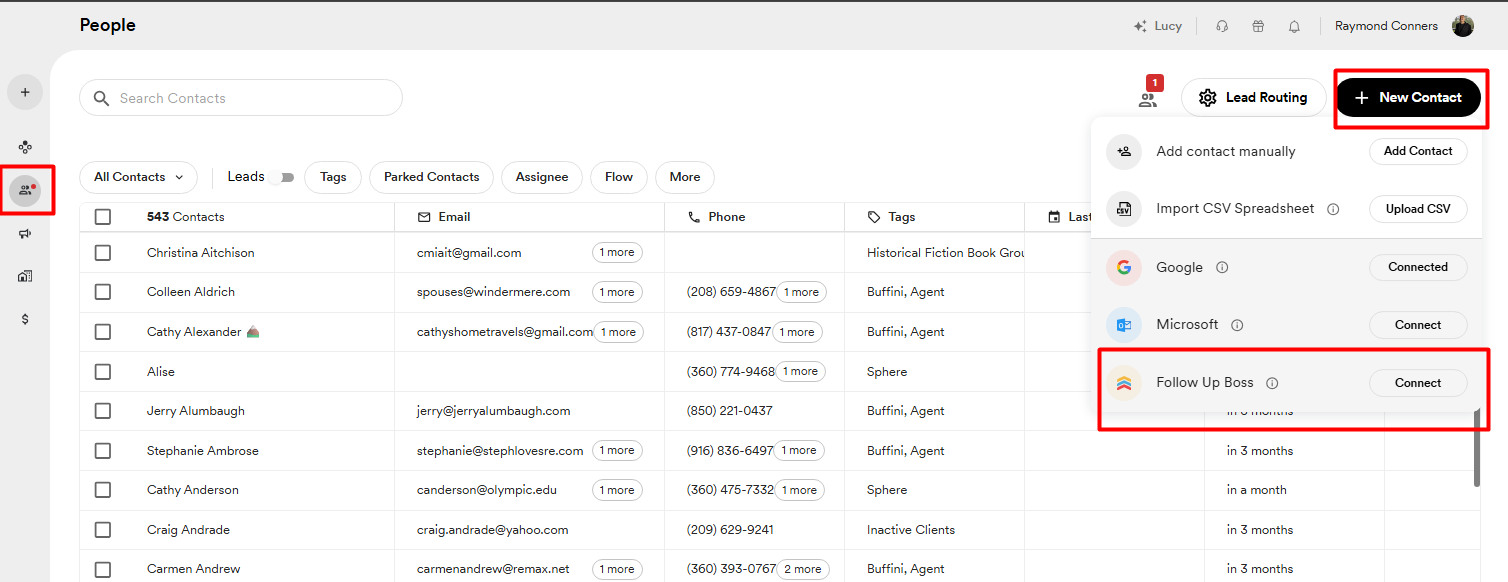
- Navigate to the People section in Rechat.
- Select New Contact.
- The Follow Up Boss integration option will be available from there.
Additional Resources
For more details, refer to Rechat's help article: https://help.rechat.com/guides/crm/contacts/follow-up-boss-fub-integration
Important Notes
- This integration is currently in beta. The Rechat team is actively working to improve it.
- If you experience any issues, reach out to [email protected] for assistance.