

Alternative Method for Creating CMAs with Multiple Properties in Rechat
Last updated: Apr 24, 2026
35
views

Overview
This alternative workflow allows you to quickly select and include multiple listings at once, making the CMA creation process more efficient.
Steps to Create a CMA with Multiple Properties
- Navigate to the MLS Search page:
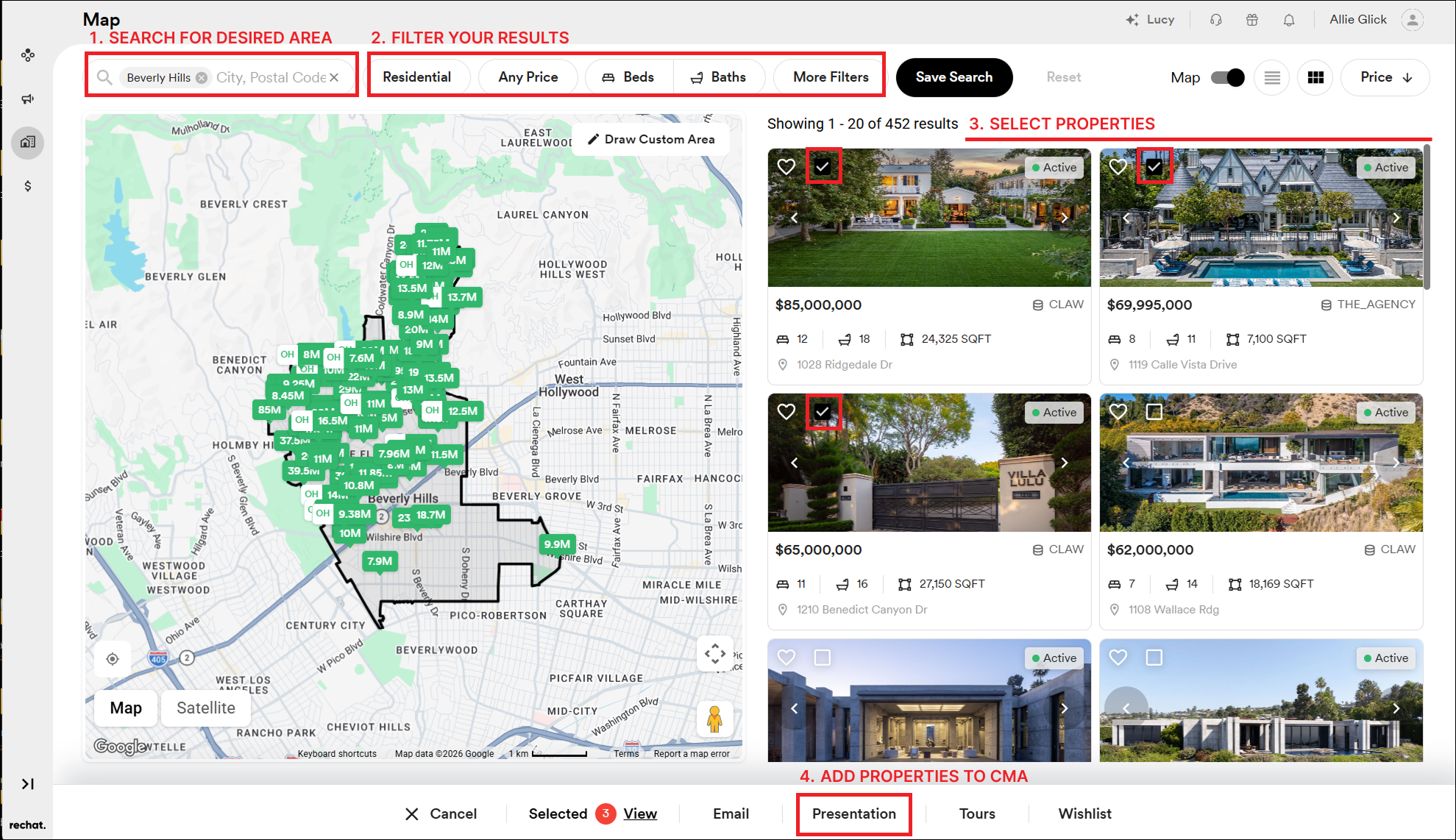
https://app.rechat.com/dashboard/mls - Search for your desired area, address, or listing criteria.
- Apply filters as needed (price range, beds/baths, property type, etc.) to refine your results.
- Select properties by checking the boxes in the top-left corner of each listing.
- Once you’ve selected all desired properties, click “Presentation” at the bottom of the screen.
- Proceed through the CMA creation flow as prompted.
Why Use This Method
- Easily select multiple properties at once
- Avoid manually adding listings one by one
- Streamlines the CMA creation process
Best Practice
Start your CMA from the MLS search page when you already know the properties or area you want to include. This method is significantly faster than beginning in the Marketing Center when working with multiple listings.

